

Building an AI agent that works every time is hard. Most AI bots act like a black box. You give them a prompt. You hope for the best. Sometimes they help you. Other times they make big mistakes. They might even make things up. Experts call this hallucination. For a real business, this is a big risk. You need a system that follows strict rules. You need a deterministic AI agent.
In this guide, we will use n8n to build one. We will mix the smarts of AI with solid logic. You will learn how to make an agent that stays on track. It will handle tasks without getting lost or confused.
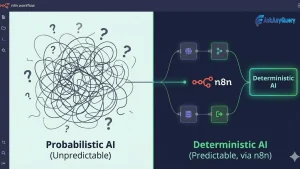
What is a Deterministic AI Agent?
Most AI models are probabilistic. This means they guess the next word. They look at the odds. This is great for writing poems or jokes. It is bad for checking bank balances. A deterministic system is different. It gives the same result for the same input every time.
Think of a train on tracks. The train can go to different stations. But it must stay on the rails. It cannot drive into a field. A deterministic AI agent uses a state machine. The state machine is the set of tracks. The AI is the engine. The engine moves the train, but the tracks control the path. This makes your automation safe. It makes it easy to trust.
Why Choose n8n for AI Development?
n8n is a powerful tool for building workflows. It uses nodes to connect different apps. You can see every step of the process. This is vital for debugging. It lets you mix standard logic with AI nodes.
One big plus is self-hosting. You can run n8n on your own server. This keeps your data private. You do not have to send everything to a third party. This build’s trust with your users. It also helps you meet legal rules like GDPR.
Step 1: Design Your State Machine
Do not open n8n yet. Start with a pen and paper. You must plan your logic first. A state machine has “states” and “transitions.”
Imagine a bot that helps with product returns.
- State: Greeting. The bot says hello.
- State: Ask for Order ID. The bot waits for a number.
- State: Verify ID. The system checks the database.
- State: Ask for Reason. The bot asks why they want a return.
- State: Confirmation. The bot finishes the job.
Each step is a box. The lines between them are transitions. You must define these clearly. If the user gives a wrong ID, the bot must stay in the “Verify ID” state. It should not skip to the end.
Step 2: Set Up Your Persistence Layer
Your agent needs to remember things. It needs to know where it is in the flow. Standard AI agents use “chat history.” This is not reliable for logic. You need a database.
A simple table in PostgreSQL or Airtable works well. Your table should have these columns:
- Session ID: A unique ID for each chat.
- Current State: The name of the current step.
- Metadata: A place to store the order ID or email.
Every time a user sends a message, n8n will look at this table. It will find the state. Then it will know what to do next.
Step 3: Create the Router Logic
In n8n, the “Switch Node” is your best friend. It acts as the brain of your state machine. Connect your input trigger to a database lookup. Then, connect that to the Switch Node.
Set the Switch Node to look at the “Current State” column.
- If the state is “Greeting,” send the data to the Greeting path.
- If the state is “Awaiting_ID,” send it to the ID path.
This ensures the AI only sees what it needs to see. It cannot go rogue. It is stuck in a specific part of the workflow.
Step 4: Add Constrained AI Nodes
Now it is time for the AI. Use the “AI Agent” node or a basic LLM node. Do not give it a big prompt. Keep it small and focused.
For the “ID Extraction” state, tell the AI: “Find the order ID in this text. It starts with #. Only return the numbers. If you do not see an ID, say ‘NOT_FOUND’.”
By giving the AI a tiny job, you stop it from rambling. You make it a functional component. It is no longer a chat bot. it is a data extractor.
Step 5: Implement Validation Loops
Validation is where most developers fail. They trust the AI too much. You must check the output.
Use an “If Node” after your AI node. Check whether the output matches your rules. If the AI had to find an email, check if it had a “@” sign.
If the check fails, do not terminate the process. Return the user to the same position. Say to the bot: “Sorry, this doesn’t look like an email. Could you please try again? “This loop keeps your data clean. This prevents unnecessary data from coming into your CRM or database.
Step 6: Update the State
When the data is validated, update your database. Change the “current status” to the next step. Save the extracted data in the “Metadata” column.
Now the agent is ready for the next message. It knows exactly where it left off. If the user stops talking for a day and comes back, the bot still knows what to do. This is a huge win for user experience.
Step 7: Handle Edge Cases
Users are unpredictable. They might say “cancel” or “help” at any time. You need a global override.
Add a “filter node” at the very beginning of your n8n workflow. It will check for keywords like “stop” or “restart.” If it finds a keyword, it will reset the database entry. This gives the user control and makes the agent feel more efficient.

Performance and Scaling
As you move forward, keep your workflow streamlined. Use “sub-workflow” for complex parts. This makes it easier to understand your main flow. Also, it allows you to reuse logic.
Keep an eye on your token usage. AI can be expensive. Since you use smaller prompts, your cost will be lower. But you still need to set limits. N8n has logs that show how much each run costs. Review them on a weekly basis.
Summary of the Build
- Map it out: Use a state machine diagram.
- Save the state: Use a database for memory.
- Route the path: Use Switch Nodes for logic.
- Constrain the AI: Give it small, specific tasks.
- Check the work: Use validation loops.
- Move forward: Update the state only when data is good.
Building this way takes more time at first. It is harder than just connecting a chat node to a model. But the result is a professional tool. It is a system you can use for sales, support, or data entry.
Ethical AI and Trust
Trust is the most important part of web development in 2026. Users want to know that AI is safe. By using a deterministic approach, you prove that you care. You show that you have guardrails. This builds a strong brand. It sets you apart from people who just make noisy chatbots.
Self-hosting n8n is another way to build trust. It shows you value data privacy. You are not just a user of AI. You are a creator of secure systems.
The Future of AI Agents
Agents are getting better every day. We’re moving on from simple chat. We are moving towards “agentic workflow.” These are systems that can plan and take action.
Learning to build deterministic agents now is a smart move. It is a skill that will be in high demand. It combines the best of old-school coding with new-school AI.
It is the perfect mix for the future of web development. Start small. Build a simple bot today. Use n8n and a single state. Once that works, add more. Soon, you will have a powerful assistant that never lets you down.